



How to Use Attimis OneBucket™
Attimis OneBucket™ provides a global data orchestration layer that enables Databricks workloads, including Serverless Compute and All-Purpose clusters, to interact with distributed object storage using a single, unified S3-compatible endpoint, `s3.attimis.cloud`. This solution unifies multiple storage sources—whether on-premise, cross-cloud, or at the edge—into one namespace, simplifying infrastructure by eliminating the need to manage separate endpoints or credentials. Databricks environments can read, write, and manage data across diverse storage platforms as if they were a single logical data lake, accelerating compute performance and ensuring consistent governance and flexibility across modern analytics and AI workloads.
- Unifies Storage: Consolidates multiple sources into one namespace.
- Simplifies Infrastructure: Eliminates the need to manage separate endpoints or complex credential sets.
- Accelerates Compute: Allows Databricks (All-Purpose or Serverless) to query distributed datasets as if they lived in a single bucket.
Option 1: Serverless Workflow
This approach is optimized for Serverless Compute, where heavy cluster-level Spark configurations are not needed. It uses the Python minio and deltalake libraries to bridge the gap between Databricks and the Attimis orchestration layer.
Implementation Steps
1. Install Required Libraries
%pip install minio deltalake delta-sharing pandas pyarrow 2. Direct Connection to Attimis Endpoint
Instead of pointing to a specific cloud vendor, we point to the Attimis global S3 endpoint.
 import io
 import pandas as pd
 from deltalake import write_deltalake
 from minio import Minio

 # Configuration
 ENDPOINT = "s3.attimis.cloud"
 BUCKET_NAME = "attimis-0000"
 ACCESS_KEY = dbutils.secrets.get(scope="attimis-onebucket", key="access-key")
 SECRET_KEY = dbutils.secrets.get(scope="attimis-onebucket", key="secret-key")

 # Initialize client
 client = Minio(
 ENDPOINT,
 access_key=ACCESS_KEY,
 secret_key=SECRET_KEY,
 secure=True)

 # List all files in NYC_Taxi/ directory
 objects = [
 obj.object_name for obj in client.list_objects(BUCKET_NAME, prefix="NYC_Taxi/", recursive=True)]
 for f in objects:
 print(f)
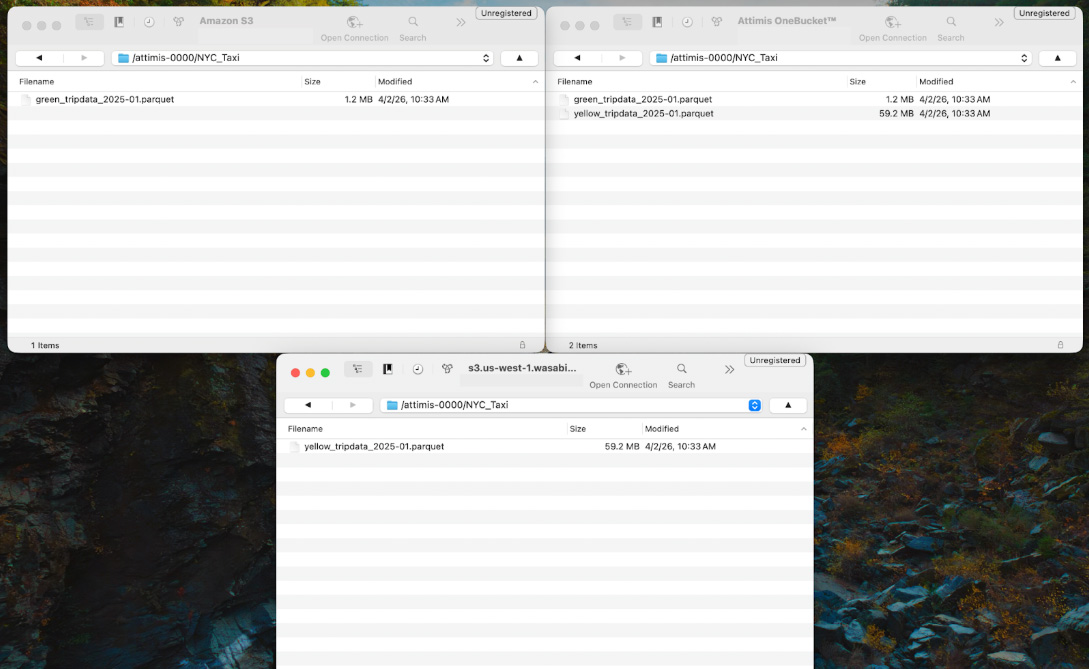
Within this bucket is a directory called NYC_Taxi, which contains Parquet datasets from the public TLC Trip Record Data. Although the datasets appear within a single namespace, they may actually reside across multiple storage systems. For example, the data could be distributed across cloud storage or on-prem environments such as Wasabi. Attimis OneBucket abstracts these locations and presents them as a unified storage system to Databricks.
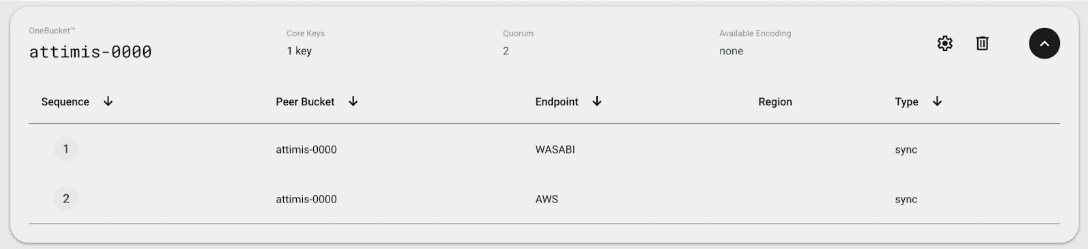
If we inspect the Attimis console, we can see that the bucket attimis-0000 is mapped to multiple storage endpoints. This means the compute layer only interacts with a single endpoint, while Attimis manages where the data is physically stored.
When objects are listed from the bucket, the unified endpoint aggregates data from multiple storage locations. In the background, Attimis policies determine which storage systems are used and orchestrate access across environments.
Many organizations already run Databricks in the cloud while maintaining data across different storage platforms. Attimis works alongside these environments by providing unified access through a single S3-compatible endpoint that abstracts the underlying storage systems.
3. Reading and Writing Data
In this step, we read two Parquet datasets from the NYC_Taxi/ directory through the Attimis OneBucket endpoint. The data is loaded into pandas Dataframes, combined into a single dataset, and then written back to the unified storage layer as a Delta Lake table in the NYC_Taxi_Delta/ directory.
 # Read taxi data onto a dataframe
 df_green = pd.read_parquet(io.BytesIO(client.get_object(BUCKET_NAME, "NYC_Taxi/green_tripdata_2025-01.parquet").read()))
 df_yellow = pd.read_parquet(io.BytesIO(client.get_object(BUCKET_NAME, "NYC_Taxi/yellow_tripdata_2025-01.parquet").read()))

 # Create a taxi_color column and merge the two datasets together
 df_green["taxi_color"] = "green"
 df_yellow["taxi_color"] = "yellow"
 df_combined = pd.concat([df_green, df_yellow], ignore_index=True)
 display(df_combined.head())

 # Create a Delta Lake table from the combined dataframe
 write_deltalake(
 f"s3://{BUCKET_NAME}/NYC_Taxi_Delta/",
 df_combined,
 mode="overwrite",
 storage_options={
 "AWS_ACCESS_KEY_ID": ACCESS_KEY,
 "AWS_SECRET_ACCESS_KEY": SECRET_KEY,
 "AWS_ENDPOINT_URL": f"https://{ENDPOINT}"} )
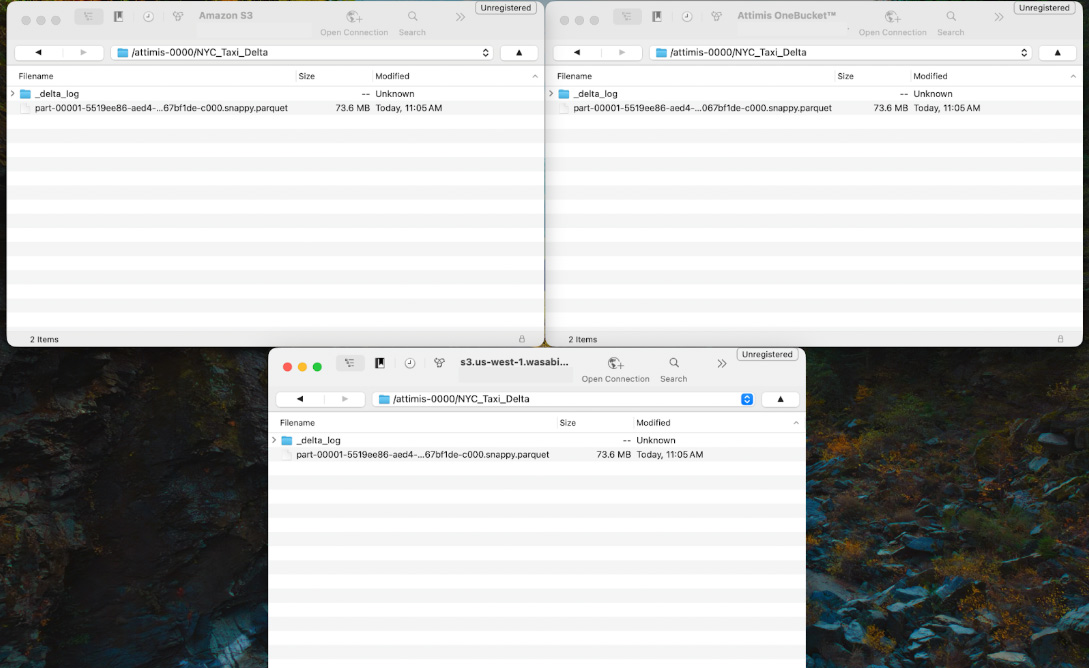
Because Attimis OneBucket is configured to write to multiple storage endpoints, the Delta table is automatically written to each configured location. In this example, the NYC_Taxi_Delta/ dataset is replicated to both AWS and Wasabi storage systems while Databricks interacts with the single s3.attimis.cloud endpoint.
Option 2: All-Purpose Cluster Workflow (S3A)
This next approach is designed for Databricks All-Purpose clusters where Spark is configured at the cluster level. Attimis OneBucket is configured directly in the Spark runtime using the S3A connector. Once configured, every notebook attached to the cluster can interact with the Attimis global endpoint without requiring additional connections.
1. Cluster-Level Configuration
Attimis OneBucket is configured once at the cluster level using Spark configuration parameters. These settings allow Spark to treat the Attimis OneBucket endpoint like any other S3-compatible storage system.
You simply add the following configuration values to the Spark Config section of your cluster. Once these settings are applied, Spark workloads across the cluster can access the Attimis global endpoint using the standard s3a:// protocol.
 # Set spark configurations for Attimis OneBucket
 spark.hadoop.fs.s3a.path.style.access true
 spark.hadoop.fs.s3a.endpoint s3.attimis.cloud
 spark.hadoop.fs.s3a.access.key NaN
 spark.hadoop.fs.s3a.secret.key NaN
2. Native Spark Operations
After the cluster configuration is complete, interacting with data through Attimis OneBucket is identical to working with any other S3-compatible endpoint. Spark can read, transform, and write datasets through the unified endpoint while Attimis OneBucket manages the underlying storage orchestration.
First, the public NYC Taxi datasets are read from the NYC_Taxi/ directory into Spark Dataframes.
 # Read public green and yellow NYC taxi trip data into a dataframe
 green_df = spark.read.parquet("s3a://attimis-0000/NYC_Taxi/green_tripdata_2025-01.parquet")
 yellow_df = spark.read.parquet("s3a://attimis-0000/NYC_Taxi/yellow_tripdata_2025-01.parquet”)
Next, a taxi_color column is added to each dataset so the taxi type of each record can be preserved. The two datasets are then merged into a single dataframe
 # Create a taxi_color column and merge the two datasets together
 green_df = green_df.withColumn("taxi_color", lit("green"))
 yellow_df = yellow_df.withColumn("taxi_color", lit("yellow"))
 df_combined = green_df.unionByName(yellow_df, allowMissingColumns=True)
Lastly, the combined dataset is written back to the OneBucket endpoint as a new dataset.
 # Write combined dataframe back
 df_combined.write.mode("overwrite").parquet("s3a://attimis-0000/NYC_Taxi_New")
Because the cluster is connected to s3.attimis.cloud, Spark interacts with a single logical storage endpoint. In the background, Attimis policies determine where the data is physically stored and can replicate or distribute objects across multiple storage platforms such as AWS, Wasabi, or other cloud, on-prem, or edge storage systems.
Why Attimis OneBucket for Databricks?
Attimis OneBucket provides a unified S3-compatible data access layer that allows Databricks workloads to interact with distributed object storage through a single endpoint. By connecting to s3.attimis.cloud, Databricks environments can read, write, and manage data across multiple storage systems without requiring separate endpoint configurations or storage-specific credentials. Because Attimis exposes a standard S3 interface, it can be used from any environment that supports S3-compatible APIs, including Databricks Serverless compute, All-Purpose Spark clusters, and other cloud-based applications.
Summary of Value
Unified Storage Access
Attimis presents multiple storage environments through a single S3-compatible endpoint. From the perspective of Databricks workloads, all datasets appear within the same namespace regardless of where the data physically resides. This allows analytics and data engineering workflows to interact with distributed storage systems as if they were a single logical data lake.
Storage Flexibility
Attimis integrates with any compute environment capable of interacting with S3-compatible storage. Because the interface remains consistent, workflows can operate across environments without requiring storage-specific configuration.
Attimis OneBucket simplifies the Databricks storage architecture by removing the complexity of managing multiple storage endpoints and credentials. By providing a unified data access layer, organizations can read, write, and manage data across any storage system while maintaining consistent governance, accessibility, and scalability for modern analytics and AI workloads.